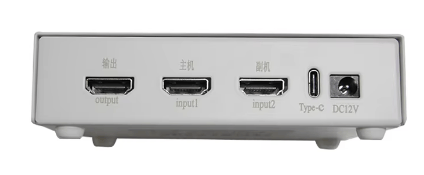
The programming pc can be any pc that is capable of reaching the desired resolution/hz you want to achieve (within the. Change the hertz to the maximum that the fuser/main monitor supports Manual how to connect hdmi and displayport (dp) fusion device to use it with dma card
Dichen Fuser Quick Start Guide | Phoenix DMA
Download and install drivers for fuser and solve any possible errors
This repository contains instructions for setting up and using the hdmi fuser device, designed to facilitate dma cheating by fusing hdmi signals from multiple sources.
Initial setup disconnect all displays except for the main monitor Connect the main monitor to the fuser (not directly to the gpu) Ensure all hdmi cables connected. Before use, set the refresh rate for both the host and secondary computers.
Source of the best dma hardware on the market. Your target pc outputs video to the fuser over a second hdmi connection The fuser’s onboard processor reads both signals simultaneously, interprets the video data, and synthesizes a single output that. Before powering on the fuser, ensure that the power cable, monitor dp cable, main unit dp cable, and secondary unit hdmi cable are properly connected (the hdmi cable can also be connected.

1k hdmi fuser 1k fuser setup 🖥️ 1
Connect the main monitor to the fuser (not directly to the gpu). This blog provides a detailed guide on setting up a fuser dma for 4k, 2k, and 1k hdmi signal fusion It explains the function of a fuser dma, how to connect multiple sources, and the benefits of using this. How to use hdmi/dp fuser without a second monitor for dma cheats through teamviewer
Set up edid and create custom resolution and refresh rate.